
You only get a few minutes with your doctor, and it's easy to forget the thing you meant to ask. DayByDay fixes that. Everything you log all month — your weight trend, your GLP-1 doses, how you've been sleeping, the side effects you noticed — can become a clean, doctor-ready report in a couple of taps. You walk in prepared, and the conversation gets to be about you, not about reconstructing the last three months from memory.
Where to find it
Open the You tab → Reports & Export. Everything in this article lives there.
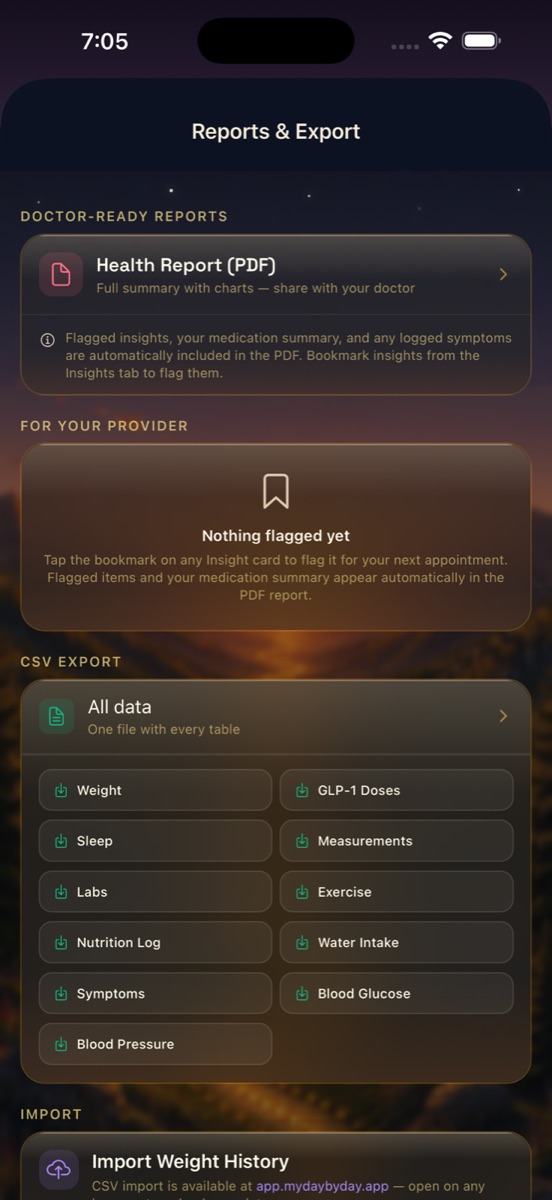
The Health Report PDF
Tap Health Report (PDF) and DayByDay builds a full, shareable summary for the date range you choose. It's designed to be read quickly during an appointment, and it pulls together the things a provider actually asks about:
- ✦Your weight trend — daily weigh-ins with a smoothed trend line, total change, and rate of loss over the period.
- ✦GLP-1 medication summary — your doses, amounts, and dates, so adherence and titration are easy to see.
- ✦Flagged insights — any moments you bookmarked (more on that below).
- ✦Logged symptoms — the side effects and notes you recorded along the way.
- ✦Key stats — body composition, sleep, and measurements where you have enough data.
Pick the right date range
For a follow-up, a 30- to 90-day report (or “since my last visit”) usually tells the clearest story. The all-time report is lovely for celebrating how far you've come.
Flag the moments that matter 🔖
This is the part people love. As you read your Insights, you'll spot things you want to raise with your doctor — a plateau, a change in body composition, a side-effect pattern. Tap the bookmark on that insight card to flag it for your next appointment.
Anything you flag is collected under “For your provider” on the Reports screen, and it's automatically included in your Health Report PDF — alongside your medication summary and any symptoms you logged. No copying, no re-typing. You notice it once, and the app remembers it for you.
Nothing flagged yet?
That's normal early on. Open the Insights tab, read your weekly story, and tap the bookmark on anything you'd want a second opinion about. It'll be waiting in your next report.
Export your raw data (CSV)
Want the actual numbers — for a spreadsheet, a dietitian, or your own records? Under CSV Export you can download everything in one file, or export any single table on its own: Weight, GLP-1 Doses, Sleep, Measurements, Labs, Exercise, Nutrition Log, Water Intake, Symptoms, Blood Glucose, and Blood Pressure.
It's your data, in a plain, portable format, whenever you want it.
Bringing history in
Switching from another tracker? Head to web.mydaybyday.app and tap Import (it's a web feature, so open it in a browser). You can bring in weight, GLP-1 doses, sleep, or measurements from a CSV, drop in The Downsized tracker spreadsheet as-is, type or paste rows into Quick entry, or upload an O2 Ring file. See Importing your history for the details.
A note on what's in the report
Every value comes from what you logged or synced from consumer devices — including any lab numbers you typed in yourself. It's a wonderful conversation starter and a record of your journey, but it isn't a substitute for clinical testing. Your provider will interpret it in the context of your full care.
Curious what your doctor sees? We wrote a companion page for clinicians — you're welcome to share it: For healthcare providers.