
Hi. We're glad you're here.
DayByDay is a warm, private companion for the weight-loss journey — especially if you're on a GLP-1 medication like Ozempic, Wegovy, Mounjaro, or Zepbound. You log what's happening (your weight, your doses, your sleep, your meals, how you feel), and DayByDay turns it into a clear, encouraging picture of your progress.
This is a long road, and some days are hard. The app is built to make the next small step feel doable — and to remind you how far you've already come. As one of our screens puts it: you're not the same person who started.
A companion, not a doctor
DayByDay is a personal wellness tracker, not a medical device. Everything it shows is for your own awareness and motivation — it doesn't diagnose, treat, or replace advice from your healthcare provider. Always talk to your care team before changing anything about your medication or health plan.
Set up in five minutes
- 1Open DayByDay and finish the welcome screens — current weight, goal weight, and whether you prefer lbs or kg (you can change any of it later in You → Profile).
- 2Log your first weigh-in: open the Track tab, tap Weight, type the number, and hit Save. That's your first data point. 🎉
- 3On iPhone, connect Apple Health (You → Health Sync) so weight, steps, sleep, and workouts flow in on their own.
- 4If you're on a GLP-1, log your most recent dose in Track → Medication so your dose schedule and medication level start working.
The best time to weigh in
First thing in the morning, after the bathroom and before eating or drinking — at roughly the same time each day. Weight bounces around with water and food; weighing consistently is what makes your trend line honest.
A quick tour of the five tabs
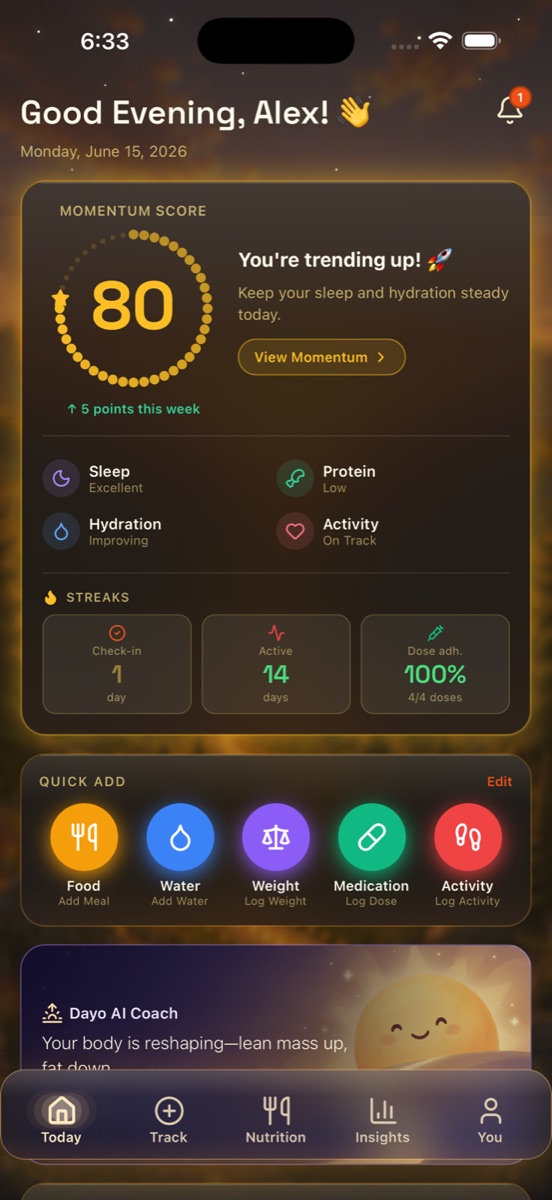
- ✦🌅 Today — your daily home. Your Momentum Score, streaks, a one-tap Quick Add, and a friendly note from Dayo, your AI coach.
- ✦✏️ Track — log anything in seconds: weight, doses, water, mood, activity, sleep, blood pressure, glucose, and more. Tap to log, hold to view history.
- ✦🍽️ Nutrition — log food the easy way, with protein and fiber front and center. Search a huge database, snap a photo of your plate, or scan a barcode. (DayByDay Plus.)
- ✦✨ Insights — Dayo reads your real data and writes you a plain-language story of how the week went, and what to nudge next.
- ✦👤 You — your goals, reports, health sync, pharmacy, and settings, all in one place.
Make it yours
DayByDay has three looks: clean Light, restful Dark, and our signature Journey Mode — a warm sunrise-to-sunset interface that makes checking in feel like a small reward instead of a chore. Switch anytime in You → Appearance.
Your data, ready for your doctor
Everything you log can become a doctor-ready PDF in a couple of taps — your weight trend, GLP-1 dose history, and any notes you've flagged. When an appointment is coming up, see Reports & your doctor. You do the living; the app does the paperwork.
What it costs
Logging is free, forever. Weight, doses, sleep, exercise, labs, mood — track all of it with no time limit on the Free plan. When you want the analysis layer — trend projections, Dayo's coaching, Journey Mode, Apple Health sync, and exports — that's Core ($4.99/mo or $49.99/yr). Add the full Nutrition module and nutrition-aware coaching with Plus ($9.99/mo or $99.99/yr).
New accounts get a 14-day free trial of the full Plus experience — no credit card to start, and you drop back to the Free plan if you don't subscribe. See Plans & billing for the full breakdown.
Premium — Try Plus free for 14 days
Unlock the full Nutrition module, trend projections, Dayo's daily coaching, Journey Mode, and Apple Health sync — no commitment, no card required.
Common first questions
Do I have to log food?✦
Not at all. Plenty of people use DayByDay just for weight, GLP-1 doses, and sleep. The Nutrition tab is there if and when you want it — it's especially helpful on a GLP-1 for making sure you're getting enough protein.
Can I bring my history from another app?✦
Yes — head to web.mydaybyday.app and tap Import. You can bring in weight, GLP-1 doses, sleep, or measurements from a CSV, drop in The Downsized tracker spreadsheet as-is, or type or paste rows into Quick entry. See Importing your history for the details.
Is my data private?✦
Your health data is encrypted, never sold, and never used for ads. You can export everything, or delete it from Settings. See Privacy & legal for what is removed.