
The hardest part of staying on a GLP-1 often isn't the shot — it's the logistics. Refills that come due on a schedule, insurance that wants a prior authorization renewed once a year, a pharmacy that's out of stock the week you finally remember. A gap in supply can undo weeks of steady progress. The Pharmacy & Refills screen quietly keeps all of it on track so you don't have to hold it in your head.
Where to find it
Open the You tab → Pharmacy. If a refill is coming due, you'll also see it surfaced right on the You screen (e.g. “Pharmacy · Refill 7d overdue”).
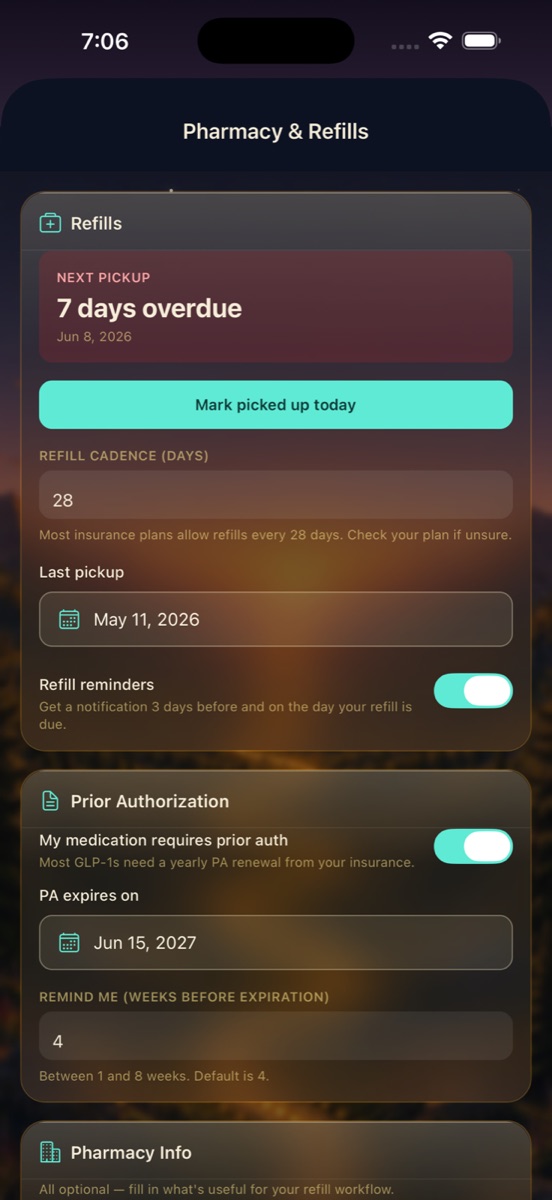
Refill timing, at a glance
The Refills card always shows your next pickup date and whether it's coming up or has slipped past — overdue dates turn red (e.g. “NEXT PICKUP · 7 days overdue · Jun 8, 2026”) so an oversight can't hide. When you collect your prescription, tap Mark picked up today. DayByDay logs the pickup and counts forward to your next one automatically.
Set your refill cadence
Under Refill cadence (days), set how often your prescription refills — most plans land on 28 days, and that's the default. As the app notes: “Most insurance plans allow refills every 28 days. Check your plan if unsure.” DayByDay uses your cadence plus your last pickup to work out the next date for you.
Refill reminders so nothing slips
Flip on Refill reminders and DayByDay will nudge you 3 days before your refill is due and again on the day — early enough to call the pharmacy if there's a stock or insurance hiccup, with a day of breathing room. It's the difference between a planned pickup and a frantic one.
Prior authorization, tracked
Most GLP-1s need a yearly prior authorization (PA) renewed with your insurance — and a lapsed PA is one of the most common ways people get stranded without their medication. Turn on “My medication requires prior auth,” set the PA expiry date (e.g. Jun 15, 2027), and choose how many weeks before expiration you'd like a heads-up (1–8 weeks; the default is 4).
When that reminder arrives, you'll have weeks — not days — to get the renewal moving with your provider's office before it ever affects a refill.
Pharmacy info (optional)
Down at the bottom, the Pharmacy Info card lets you save details like your pharmacy's name and number — handy for those “is it ready yet?” calls. As the app puts it: “All optional — fill in what's useful for your refill workflow.” Skip anything you don't need.
Useful for the insurance conversation, too
Your refill cadence, last and next pickup, and prior-auth timeline are exactly the details that come up with your provider's office and pharmacist when sorting out coverage. Keeping them here means you can answer “when's it due” and “when does the PA renew” on the spot — and pair them with your GLP-1 dose log for the full medication picture. See Reports & your doctor.
A helper, not your pharmacy
Refill cadence and prior-auth rules vary by plan and medication, and they change. DayByDay's reminders are a convenience based on the dates you enter — they don't reflect your actual insurance status or pharmacy stock. Always confirm coverage and timing with your pharmacy and insurer, and follow your provider's instructions.
What if my plan refills every 30 days, not 28?✦
Just change the Refill cadence (days) field to match your plan. DayByDay uses whatever number you set to calculate your next pickup.
Will I get reminders if notifications are off?✦
Reminders rely on your notification settings. You can choose phone alerts, the in-app Notification Center, or both in You → Notifications. See Notifications.
Does this order or refill my medication for me?✦
No — DayByDay tracks dates and reminds you, but it doesn't contact your pharmacy or insurer. You (or your provider's office) handle the actual refill and any prior-auth renewal.