

The scale is one storyteller, and it isn't always the most honest one. A week it barely moves can be a week your waist shrank, your clothes loosened, and your body composition quietly shifted in exactly the right direction. The Body section is where all of that gets to count.
You'll find it under Weight → Body, with sub-tabs for Measure, Labs, DEXA, and Clothing.
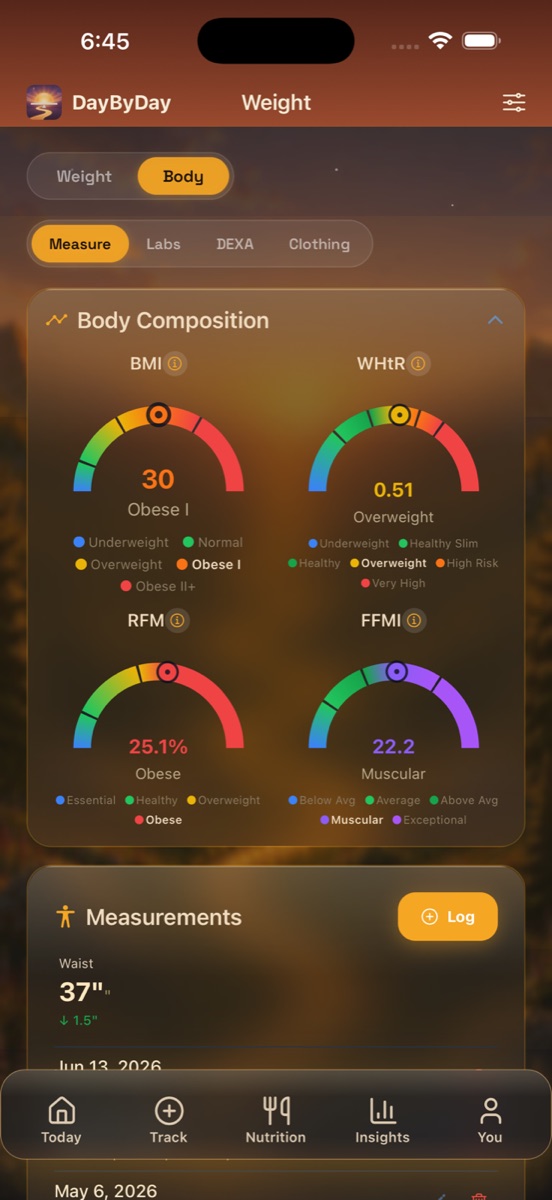
Body measurements — track inches, not just pounds
Tap Log to record your waist, chest, and neck, and DayByDay shows each one with its change over time — for example, Waist 37″ · ↓ 1.5″. Waist circumference in particular often moves before the scale does, because the body tends to burn the fat around your organs first. Watching that number fall is one of the most quietly satisfying parts of the journey.
How often to measure
Once a week or every couple of weeks is plenty — measurements change slowly, and daily checking just invites discouragement. Same day, same time, same posture each time keeps it honest.
Body composition at a glance
Above your measurements sit four gauges that turn your numbers into a richer read than weight alone — for example BMI 30, WHtR 0.51, RFM 25.1%, and FFMI 22.2 (“Muscular”).
- ✦BMI — weight relative to height. Widely used, but blind to muscle and composition.
- ✦WHtR (waist-to-height ratio) — waist divided by height; under 0.5 is a common general-health target.
- ✦RFM (relative fat mass) — estimates body fat from waist and height, no special scale needed.
- ✦FFMI (fat-free mass index) — your lean mass relative to height, lovely for watching muscle hold steady while fat comes off.
Want the formulas?
Every one of these is explained in full, with citations, on the Science & formulas page.
Clothing sizes — celebrate sizing down
The Clothing sub-tab lets you log your shirt, pants, and dress sizes over time. When you size down, DayByDay marks the moment — because it deserves marking. There's nothing like a pair of jeans that suddenly fits to remind you the work is real, even on a week the scale won't budge.
Log it the moment you notice
No schedule needed — just add an entry whenever something feels looser. Months later, that little history is one of the most motivating things to look back on.
Labs
The Labs sub-tab is where you keep the bloodwork your provider already watches — especially helpful on a GLP-1, where several of these get checked over time. You enter them by hand from your lab report, and DayByDay trends them so a year of results lives in one tidy place.
- ✦A1c (HbA1c) — your average blood sugar over the past 2–3 months, as a percentage.
- ✦Fasting glucose — blood sugar after not eating for several hours.
- ✦Cholesterol / lipid panel — total cholesterol, LDL, HDL, and triglycerides.
- ✦And other markers your care team asks you to keep an eye on.
Lab numbers need clinical context
Labs in DayByDay are your personal record, nothing more. What's “normal” varies from person to person, and only your provider can interpret a value in the context of your whole health. Always talk results over with your care team before changing anything.
DEXA scans
If you've had a DEXA (DXA) scan, the DEXA sub-tab stores the detailed body-composition numbers it produces — body fat %, lean mass, bone density, RMR, and visceral fat. A DEXA is the gold standard for seeing exactly where your weight is coming from, and keeping yours here means the next scan has something to compare against.
Logging is free; the analysis is Core
Recording measurements, sizes, labs, and DEXA results costs nothing. The trends, composition gauges, and Dayo's read on what it all means are part of DayByDay Core — included in your 14-day trial. See Plans & billing.
Heading to an appointment?
This is appointment gold. A waist that's down an inch and a half, an improving A1c or lipid panel, a DEXA showing muscle held while fat dropped — those are the things a provider lights up over. Bookmark the insight to flag it, and it all exports to CSV and into your Health Report PDF. See Reports & your care team.
Does DayByDay connect to my lab or hospital system?✦
Not yet — you enter lab values by hand from your paper or digital report. Tying into patient portals is on the roadmap.
What units does it use?✦
Measurements are stored in centimeters and shown in inches if that's your preference; labs use standard US units (mg/dL, %). Change your display in You → Units.
Can I share my measurements and labs with my doctor?✦
Yes. Everything in Body exports to CSV from You → Reports & Export, and your waist trend, labs, and DEXA results fold into the Health Report PDF you can hand straight to your provider.