
A good night doesn't just feel better — it makes the whole journey easier. Sleep steadies the hunger hormones GLP-1 medications are already working on, gives your body the room to recover, and quietly shapes how the rest of your day goes. So DayByDay treats your sleep as something worth understanding, not just a number to chase.
You'll find your Sleep card on the Today tab, and the full picture by opening it (or by tapping Sleep on the Track tab). Here's how to read what you see.
A wellness picture, not a sleep study
Sleep stages from a watch or ring are a smart estimate, not a clinical lab measurement — and blood oxygen from a consumer sensor isn't medical-grade. DayByDay helps you spot patterns over time; it doesn't diagnose anything. If you ever worry about your breathing at night or sleep apnea, please bring it to your healthcare provider.
Total sleep and your Sleep Score
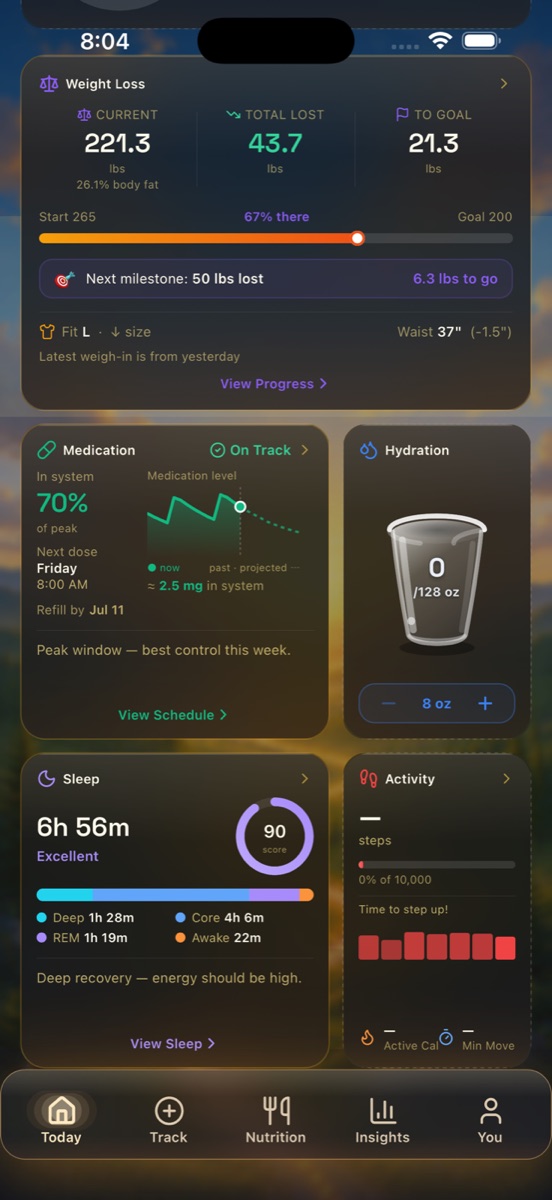
At the top you'll see how long you slept — say 6h 56m — and a single Sleep Score from 0 to 100 (for example, 90) with a plain-language read like “Deep recovery — energy should be high.” The score blends how long you slept, how your time was divided across the stages, and how settled the night was, so one glance tells you whether last night set you up well.
There's no perfect number, and one rough night isn't a failure. What you're really watching is the trend — are your scores drifting up as you build steadier habits?
The stages of your night
Your body cycles through four stages while you sleep, and DayByDay shows the time spent in each — for example Deep 1h 28m, Core 4h 6m, REM 1h 19m, Awake 22m.
- ✦Deep (slow-wave) sleep — the most restorative stage. This is where your body repairs tissue and recovers from the day. Precious, and usually the first thing poor sleep steals.
- ✦Core (light) sleep — the bridge between cycles, and the largest slice of most nights. Lighter, but far from wasted.
- ✦REM sleep — the dreaming stage, where your brain sorts through memory and emotion.
- ✦Awake — the brief surfacings that happen to everyone. A little is completely normal; a lot can fragment your rest.
There's no single “correct” mix — stage ratios shift with age, health, and life. Over weeks, more deep and REM sleep is the gentle direction to hope for.
Your Energy Schedule
Below your sleep stages, DayByDay draws out your Energy Schedule — a predicted curve of your energy through the day, with a morning peak, an afternoon dip, and an evening peak. Alongside it is a daily Energy Potential percentage, a quick read on how good today is shaping up to be.
It's modeled from your circadian rhythm (when you typically sleep and wake) and your current sleep debt, not a generic template — so it's genuinely yours. Use it to plan focused work for your highs and ease off during the dips instead of fighting them.
Sleep debt — measured against your own need
DayByDay also tracks your sleep debt — how much sleep you owe yourself. It's not measured against a generic 7 hours; it starts from a default of 8 hours and adapts within the recommended 7–9 hour range as it learns your own personalized sleep need. Debt pays down naturally on the nights you sleep in or catch up, so one long night can meaningfully close the gap.
Curious about the recovery side of things? Your Resilience Score — an HRV-based read on how well your body is bouncing back — lives on the dashboard alongside your Sleep Score. See the glossary for how it's calculated.
Blood oxygen (SpO2)
If you wear a device that records it, DayByDay shows your overnight blood oxygen — your minimum and average O2, how many dips per hour you had, and an overall O2 Score. For most healthy adults SpO2 sits between 95% and 100% overnight, with brief dips here and there being perfectly ordinary.
Tracking dips and your average over time helps you notice a pattern worth a conversation — not jump to a conclusion. The O2 Score rolls it all into one number so you can watch how steady your nights are.
What's a “dip”?
A dip is when your blood oxygen falls a few percent below your baseline for a short stretch. A handful per hour is generally unremarkable; many of them, night after night, is the kind of pattern worth mentioning to your doctor.
Overnight vitals
When the data's available, you'll also see two quiet signals from your night: your heart rate and your respiratory rate while you slept. A resting heart rate that drifts lower over months is often a sign your cardiovascular fitness is genuinely improving — a lovely thing to watch alongside the scale.
Where the data comes from
Most of this flows in on its own. Apple Health brings sleep, stages, heart rate, and respiratory rate from your Apple Watch (or any app that writes to Health) — turn it on in You → Health Sync. For more detailed overnight oxygen, a Wellue / Viatom O2 Ring records minute-by-minute SpO2 and pulse — far more granular than most watches.
Sleep insights are part of Core
Logging your sleep is free. The Sleep Score, trends, and Dayo's read on how rest connects to your weight loss are part of DayByDay Core — included in your 14-day trial. See Plans & billing.
How sleep connects to your weight loss
This is the part that's easy to underestimate. Short, broken sleep nudges appetite up and willpower down, and it slows the recovery your body needs to keep going. Dayo, your AI coach, watches for these threads in your data — you might see something like “your weight held steady this week, and your sleep dipped right alongside it.” It's not blame; it's a clue. Sometimes the kindest thing you can do for tomorrow's number is go to bed.
Heading to an appointment?
A run of low Sleep Scores or frequent overnight oxygen dips is exactly the kind of pattern worth raising. Bookmark a sleep insight on the Insights tab to flag it, and it lands automatically in your Health Report PDF — no notes to scribble. See Reports & your care team.
I have an Apple Watch but my sleep stages aren't showing.✦
Sleep stage detail needs a recent watchOS version and a couple of nights of wearing your watch to bed. Check that sleep tracking is on in the Health app on your iPhone, confirm sleep permissions in You → Health Sync, then re-open the Sleep card.
Does DayByDay diagnose sleep apnea?✦
No. DayByDay is a personal companion, not a diagnostic tool, and consumer sensors aren't medical-grade. If your oxygen scores are consistently low or you're concerned about your breathing at night, please see a healthcare provider — and bring your Health Report along.
Can I log a night by hand?✦
Yes. You can add a night manually from the Track tab if you slept without a device — even just total time gives you something to trend.