

Some weeks the scale lies. You did everything right and it goes up two pounds anyway — water, salt, a late dinner, the time of the month. The Weight screen is built to keep that from breaking your heart. It quietly cuts through the daily noise and shows you the line that's actually true: where you're really headed.
The hero — your week in one warm line
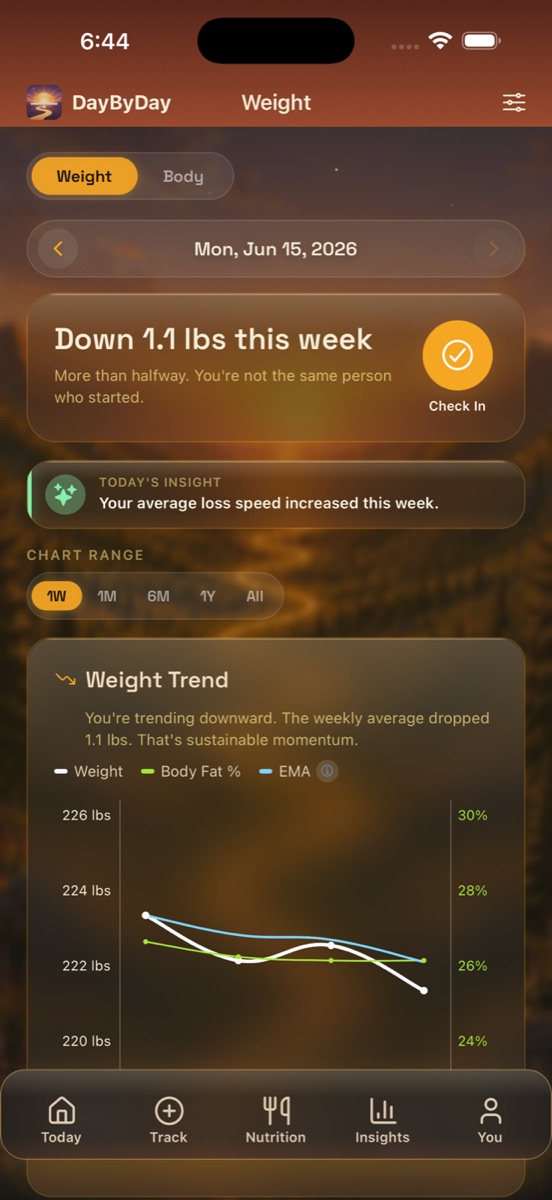
At the top, DayByDay reads your recent weigh-ins and greets you with the headline that matters — something like “Down 1.1 lbs this week” with a kind word underneath: “More than halfway. You're not the same person who started.” It's the same number a spreadsheet would give you, but framed the way a good friend would say it.
To add today's weigh-in, tap the circular Check In button. Enter your weight — and, if you have it, your body fat percentage — and save. That's it. The chart and every stat update on the spot. (You can also log from Track → Weight; both land in the same place.)
Weigh in at the same time each day
First thing in the morning, after the bathroom and before eating or drinking, is ideal. Your weight swings a few pounds across a day on water and food alone — weighing consistently is what makes the trend line honest.
The Weight Trend chart — and the line that tells the truth
The chart layers a few things at once. The scattered points are your raw weigh-ins, exactly as you logged them — jumpy, because real weight is jumpy. Running through them is the smoothed trend line: a rolling average of your last 7 weigh-ins that irons out the spikes so you can see the real direction. That smoothed line is the one to watch. When it slopes down, you're losing fat — no matter what this morning's number did.
DayByDay says it for you right on the chart: “You're trending downward. The weekly average dropped 1.1 lbs. That's sustainable momentum.” A single high reading after a salty meal isn't a setback. The line across the weeks is your real progress.
Two stories on one chart
The chart has a dual axis: weight on the left (e.g. 220–226 lbs) and body fat % on the right (e.g. 24%–30%), with a separate line for each. That lets you see something the scale alone can't — weeks where your weight holds steady but your body fat keeps falling. That's muscle staying put while fat leaves, and it's exactly what you want.
Zoom in, or zoom out for perspective
Use the Chart Range buttons — 1W, 1M, 6M, 1Y, All — to change how much history you see. Short ranges show the texture of the last few days. When a week feels discouraging, switch to 6M or All: zooming out is the fastest way to remember how far you've actually come.
The Body sub-tab — the fuller picture
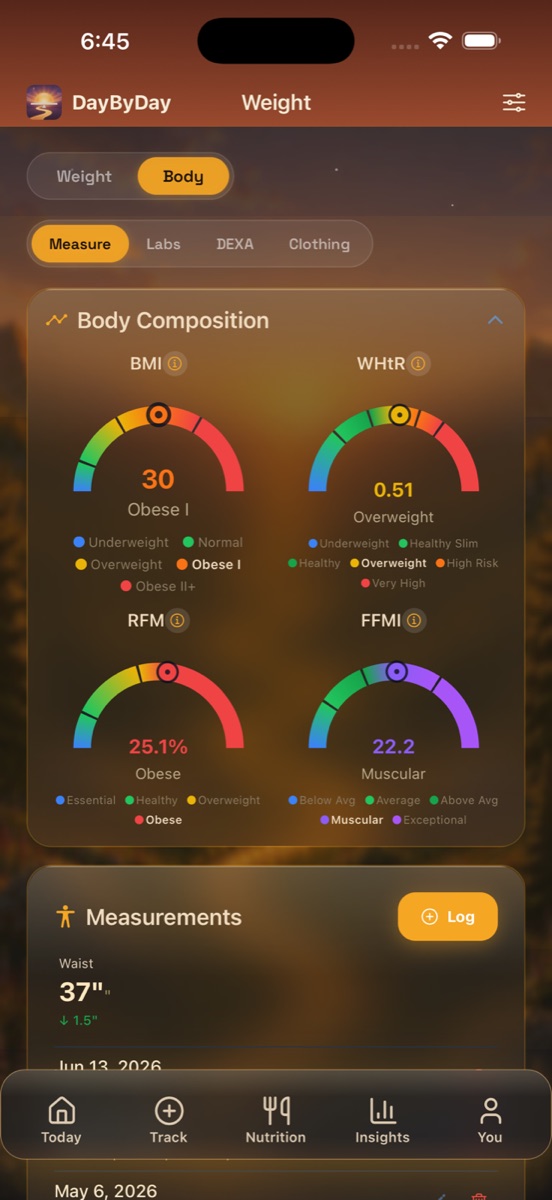
Tap the Body toggle at the top and the screen shifts from “how much I weigh” to “what my body is made of.” It's a gentler, more complete view — because two people at the same weight can be in very different shape, and the scale was never going to tell you that.
Four gauges, no judgment
These are estimates, not verdicts. They're here to give you context and to watch the needle move over time — that's where the real signal is. Each gauge sits on a color band so you can see roughly where you fall today.
- ✦BMI — body mass index, a quick weight-for-height ratio. It's a blunt tool (it can't tell muscle from fat), but it's the number most clinicians still reference, so it's handy to have.
- ✦WHtR — waist-to-height ratio. Your waist measurement divided by your height. Many researchers consider it a better everyday read on health risk than BMI, because it reflects where you carry weight.
- ✦RFM — relative fat mass, an estimate of body fat percentage from your height and waist. A friendlier estimate than skin pinches, and it trends nicely as your waist shrinks.
- ✦FFMI — fat-free mass index, a measure of how much lean muscle you carry for your height. This is the one to celebrate on a GLP-1: holding or building lean mass while you lose fat is the goal.
Watch the trend, not the label
A gauge that reads “Obese I” or “Overweight” today is a starting point, not a sentence. What matters is the direction it's moving over the months — and you're the one moving it.
Measure · Labs · DEXA · Clothing
Under the gauges, four sub-sections hold the rest of the body story — log what you have, skip what you don't:
- ✦Measure — waist, chest, neck, and hips, with the change since last time (e.g. Waist 37" · ↓ 1.5"). Inches lost often show up here before the scale catches on.
- ✦Labs — type in results from your bloodwork: A1c, glucose, cholesterol, triglycerides, and more, each charted over time.
- ✦DEXA — log a DEXA / DXA scan (body fat %, lean mass, bone density, visceral fat) for the most precise body-composition snapshot you can get.
- ✦Clothing — record shirt, pants, and dress sizes, and celebrate the day you size down. That win is real even when the scale is quiet.
Heading to an appointment?
A smoothed weight trend with your rate of loss, plus body composition and waist change, is exactly the trajectory a clinician wants to see — far more useful than a single number. It all flows into your Health Report PDF automatically. See Reports & your doctor.
Estimates for your awareness
BMI, WHtR, RFM, FFMI, lean and fat mass are calculated estimates from the numbers you enter — useful for motivation and tracking trends, but not clinical measurements. Any lab or DEXA values come from what you typed in. Your care team interprets all of it in the context of your full health.
Can I log more than one weigh-in in a day?✦
You can, but DayByDay uses the most recent entry for that day in its trend math. If you weigh in twice, the later reading is the one that counts.
Why did my weight go up when I've been doing everything right?✦
Day-to-day weight swings on water, salt, fiber, hormones, and digestion — none of which is fat. That's exactly what the smoothed trend line is for. Look at the line over a couple of weeks, not at this morning's number.
Do I have to track body fat or measurements?✦
No — weight alone works beautifully. But if you add body fat or your waist measurement, the dual-axis chart and the Body gauges can show you fat loss your scale weight sometimes hides, which is especially encouraging on a GLP-1.