
Being on a GLP-1 comes with a quiet to-do list: which day is shot day, which spot did I use last week, how am I tolerating this dose, when's the refill. DayByDay carries that list for you. You log each dose in a few taps, and the app keeps the schedule, the rotation, and the record — so the medication can do its work while you get on with your day.
Your next-dose schedule
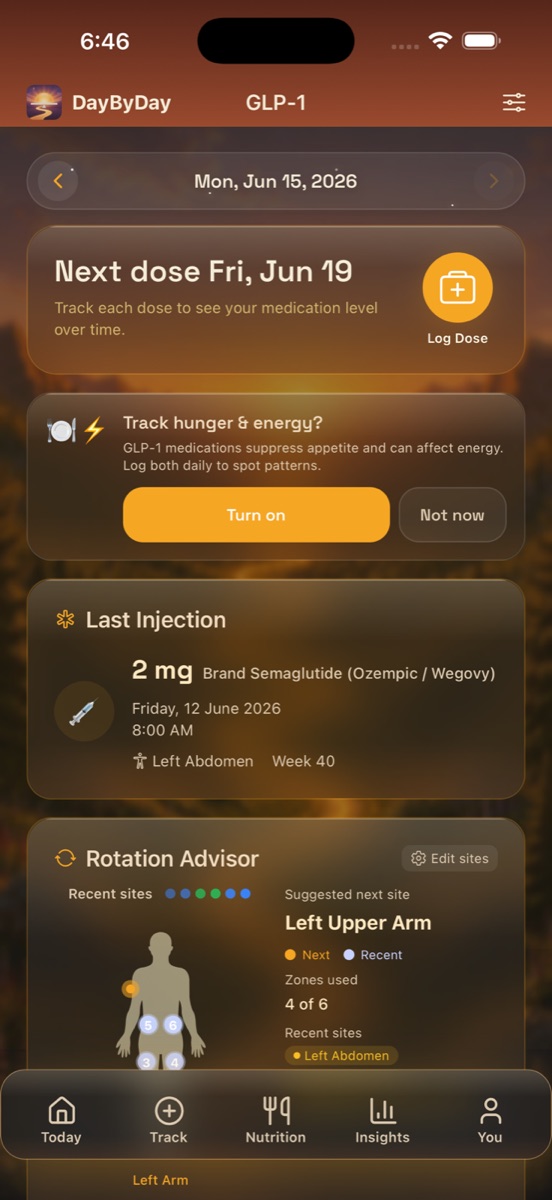
At the top, the Next dose card tells you when your next injection is due — for example “Next dose Fri, Jun 19.” Tap the circular Log Dose button when you take it, and the schedule rolls forward on its own. No mental math about which week you're in or whether you already did it.
Just below, the Last Injection card keeps the receipt: the amount and medication, the date and time, the site, and your week on therapy — e.g. “2 mg Brand Semaglutide (Ozempic / Wegovy) · Friday, 12 June 2026 · 8:00 AM · 📍 Left Abdomen · Week 40.”
Logging a dose
Tapping Log Dose (here or from Track → Medication) opens a quick sheet. The basics are pre-filled from your last dose, so most weeks it's a single confirming tap.
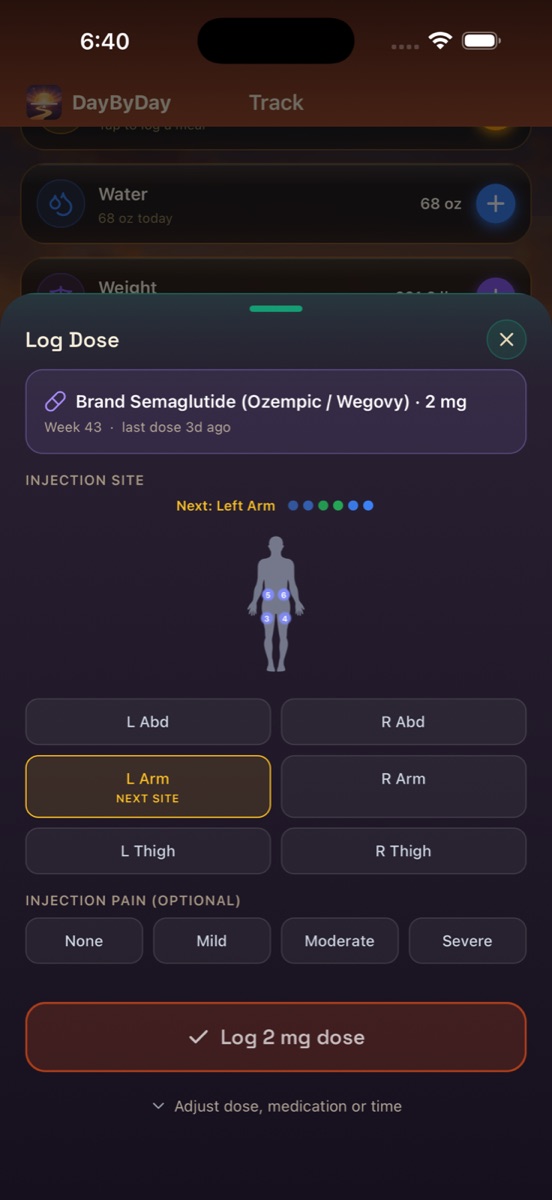
- ✦Dose amount — in mg (e.g. 2 mg). Enter exactly what your prescriber wrote.
- ✦Medication — choose yours from the list (Brand Semaglutide / Ozempic / Wegovy, tirzepatide / Mounjaro / Zepbound, liraglutide / Saxenda, and more), or enter a custom one.
- ✦Week on therapy — DayByDay tracks which week you're on automatically, so your titration history builds itself.
- ✦Injection site — tap the site you used on the body diagram (L/R Abdomen, L/R Arm, L/R Thigh). The next suggested site is highlighted for you.
- ✦Injection pain (optional) — None / Mild / Moderate / Severe, if you'd like to track how a site or dose felt.
Need to change the date, time, or anything else for a backfilled dose? Tap “Adjust dose, medication or time.” DayByDay supports all the major GLP-1 and GIP/GLP-1 medications, weekly or daily.
The Rotation Advisor 📍
Injecting the same spot week after week can cause the tissue underneath to harden, which can make absorption less reliable. Rotating helps — but remembering where you went last time is the annoying part. The Rotation Advisor remembers for you.
It shows your recent sites as colored dots on a little body diagram, tracks how many zones you've used (e.g. “Zones used 4 of 6”), and simply tells you where to go next: “Suggested next site: Left Upper Arm.” Follow it or override it — and tap Edit sites to tailor which zones are in your rotation.
Your medication level over time
As you log doses, DayByDay charts an estimate of how much medication is active in your system. It climbs after an injection, crests in your peak window, and tapers as your body clears it before the next dose. It's a helpful way to picture where you are in the cycle — handy context for when appetite or side effects ebb and flow across the week.
This is an estimate, never a measurement
The medication level is a pharmacokinetic estimate from typical drug data — not a reading of what's actually in your blood, and everyone metabolizes differently. Never use it as a reason to change, skip, double, or time a dose. Dosing is your prescriber's call, always. Follow their instructions exactly.
Hunger & energy — optional daily check-ins
GLP-1s turn down appetite and can shift your energy, sometimes in patterns worth noticing. If you tap Turn on on the “Track hunger & energy?” card, DayByDay adds a tiny daily check-in for both. Over a few weeks it reveals the rhythm — say, lower hunger and energy in the first day or two after a dose — which is genuinely useful to talk through with your provider. It's entirely optional; tap Not now if you'd rather skip it.
A ready-made record for appointments
Your full dose log — amount, medication, site, week on therapy, schedule — alongside hunger/energy and any symptoms you've noted is a complete adherence and tolerability picture for your care team. It flows straight into your Health Report PDF, so you walk in with the answers already gathered. See Reports & your doctor.
A companion, not a prescriber
GLP-1 medications are prescription drugs. DayByDay helps you stay organized and consistent — it does not advise on dosing, titration, or whether a medication is right for you. Always follow your healthcare provider's instructions.
Can I track more than one medication?✦
Yes. If you've switched medications or take more than one, DayByDay can track them side by side, each with its own schedule and level estimate.
I forgot to log a dose — can I add it later?✦
Absolutely. In the Log Dose sheet, tap “Adjust dose, medication or time” to set the date and time it was actually taken. You can also edit any past dose from your history.
My dose is in units, not mg. Does that work?✦
Enter whatever your prescriber prescribed — DayByDay stores the number and unit you choose, so it works whether your dose is in milligrams or units.