
Movement counts even when the scale is quiet. Some of the clearest signs that things are working — more steps, a heart that beats slower at rest, week after week of showing up — never appear on a weigh-in. The Activity screen gathers all of that into one warm, honest view.
Open it from the Activity card on Today, or tap Activity on the Track tab.
Your steps and goal ring
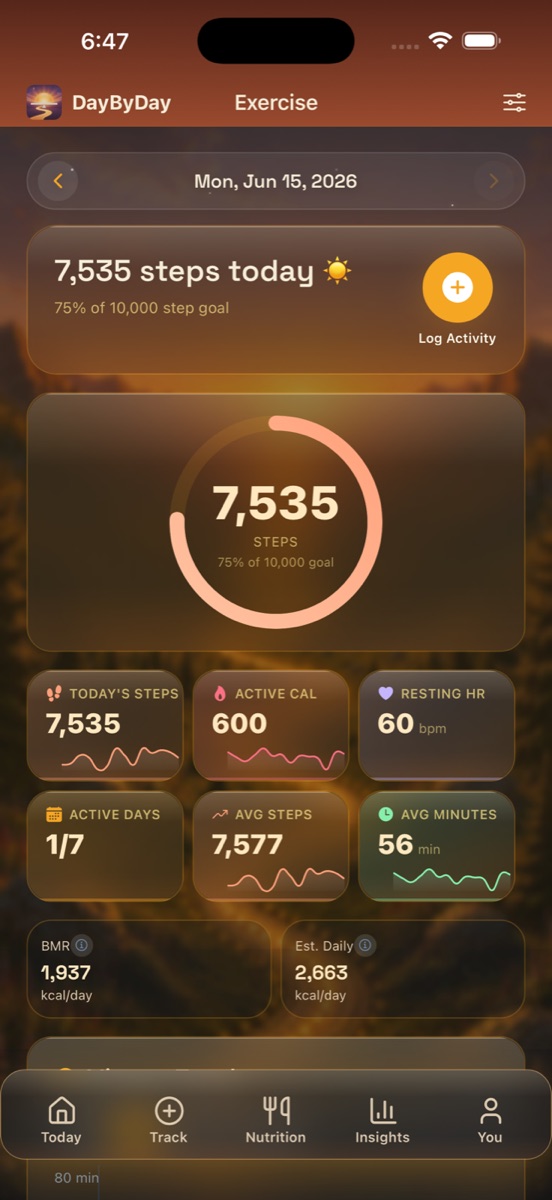
At the top, a big progress ring shows your steps against your daily goal — for example, 7,535 of 10,000 (about 75% there) with a cheerful “☀️” when you're moving well. Steps are the simplest, most reliable read on how active your day has been, and the ring makes “a few more” feel like an easy, doable nudge rather than a chore.
The numbers that matter
Below the ring, a row of stat tiles (each with a little sparkline) tells the fuller story:
- ✦Today's Steps — your current count (e.g. 7,535).
- ✦Active Cal — the calories you burned through movement, on top of what your body burns just to keep you going (e.g. 600).
- ✦Resting HR — your heart rate at rest (e.g. 60 bpm). As fitness improves, this tends to drift lower over months — one of the clearest, quietest signs your body is changing.
- ✦Active Days — how many days this week you've moved (e.g. 1/7). Consistency, not intensity, is what carries a journey.
- ✦Avg Steps and Avg Minutes — your typical week, so a single slow day doesn't feel like the whole picture.
Your daily burn (BMR & TDEE)
Near the bottom you'll see two energy estimates: your BMR — what your body burns at rest just to stay alive (e.g. 1,937 kcal/day) — and your Est. Daily burn, your BMR plus the movement you logged (e.g. 2,663 kcal/day). Together that's your total daily energy expenditure, a rough sense of how much fuel your day actually uses.
These are estimates, not exact numbers
BMR and daily-burn figures come from standard population equations, not a measurement of your specific metabolism. Treat them as a friendly ballpark, not a target to eat or exercise against. For personalized nutrition guidance, a registered dietitian is your best bet.
Most of it syncs on its own
Steps, active calories, and workout minutes flow in automatically from Apple Health — your Apple Watch and other devices do the counting, and DayByDay just reads it. Turn it on once in You → Health Sync and you'll rarely think about it again.
Logging a workout by hand
Some movement doesn't get captured — a strength session you didn't wear your watch for, a bike ride that didn't register. For those, head to Track → Activity and add it yourself.
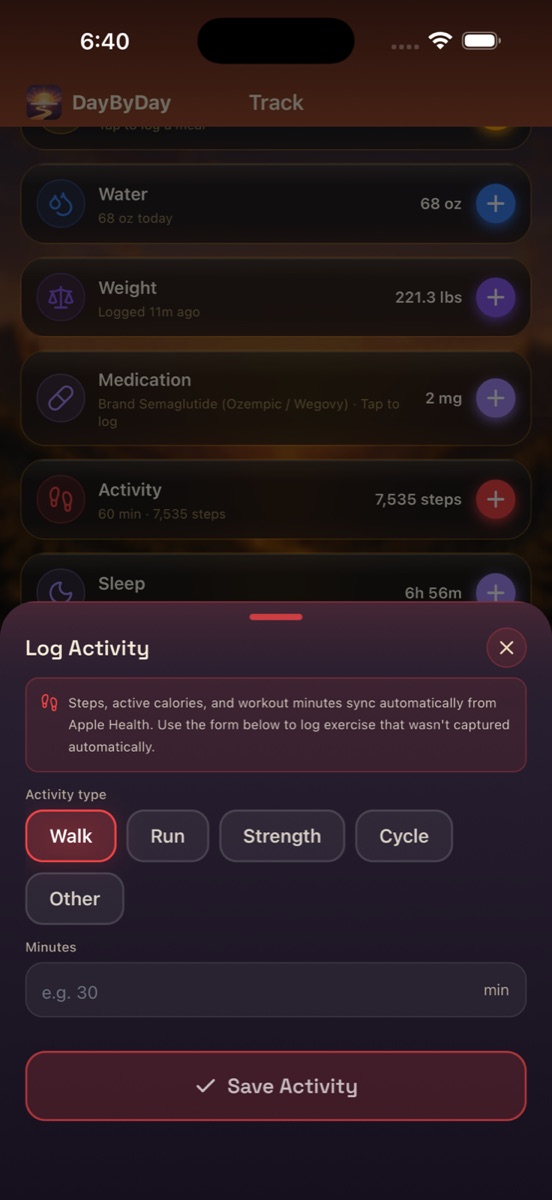
- 1Open the Track tab and tap Activity.
- 2Choose the activity type — Walk, Run, Strength, Cycle, or Other.
- 3Enter the duration in minutes.
- 4Tap Save Activity.
Activity tracking is free; the analysis is Core
Logging and syncing your activity costs nothing. The trend charts, daily-burn estimates, and Dayo's read on how movement connects to your progress are part of DayByDay Core — included in your 14-day trial. See Plans & billing.
Heading to an appointment?
A resting heart rate trending down and a steady pattern of active days are great context for a provider — concrete proof the work is paying off, even on weeks the scale stalls. It all exports to your Health Report PDF and to CSV. See Reports & your care team.
My steps in DayByDay don't match my iPhone.✦
Step counts can differ slightly if you carry more than one Apple device. Apple Health deduplicates across sources, but small gaps happen. The number you see reflects what Apple Health reports.
Do I need an Apple Watch?✦
No. Your iPhone counts steps on its own, and you can log workouts by hand from Track → Activity. A watch simply adds richer data like active calories and resting heart rate.
Can I remove a workout I logged?✦
Yes. Open the Activity screen, find the entry in your history, and delete it from there.