

Today is the first thing you see when you open DayByDay, and it's designed to answer one question in a single glance: how am I doing right now? No spreadsheets, no guilt — just a warm, honest read on your day and a couple of easy next steps.
Your Momentum Score
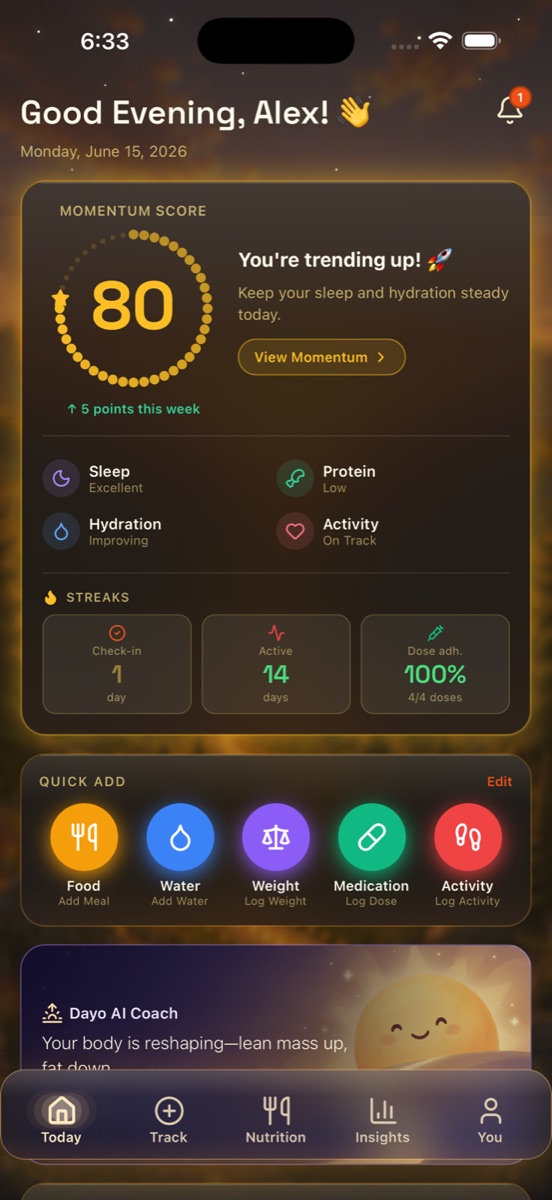
At the top is your Momentum Score — a 0–100 ring that blends how you've been doing across up to seven signals that actually move the needle: sleep, hydration, activity, medication adherence, weight trend, calories, and protein — only counting the ones you actually track. It's not a grade and it's not about being perfect. It's a gentle gauge of which way you're heading.
Under the ring you'll see those factors called out — for example Sleep: Excellent, Protein: Needs love, Hydration: Improving, Activity: On track — so you can see why the number is what it is, and where a small win is waiting. Tap View Momentum for the full breakdown.
A low number isn't a bad day
When momentum dips, DayByDay doesn't scold — it nudges. You'll see something like “Let's build momentum 🌱 — small wins add up. Log a check-in to start.” One log is often all it takes to turn the day around.
Streaks that celebrate consistency
The Streaks card tracks the habits that carry a weight-loss journey: your Check-in streak, your Active streak, and your medication adherence (for example, 100% — 4 of 4 doses). Consistency, not intensity, is what gets you to goal — and this is where it gets noticed.
Quick Add — log in one tap
The Quick Add row puts your five most common logs one tap away: Food, Water, Weight, Medication, and Activity. Each opens a small sheet, you fill in a number, and you're done. Tap Edit to choose which buttons appear.
Hold a Quick Add button for a shortcut
Tap Water to add 8 oz instantly — or press and hold it to pick a custom amount. Hold Food and you'll get a quick Protein/Fiber stepper, so you can log macros in seconds without searching. See Tips & hidden shortcuts for the full list.
A daily note from Dayo
Dayo is your AI coach (powered by Anthropic Claude). Right on Today you'll get a short, plain-language read on what your data is saying — like “Your body is reshaping — lean mass up, fat down.” Every line is grounded in your real numbers, never generic filler. For the full story, head to the Insights tab.
Dayo is part of Core
The Momentum Score, streaks, and Quick Add are free. Dayo's coaching notes are part of DayByDay Core (included in your 14-day trial). See Plans & billing.
Your day at a glance
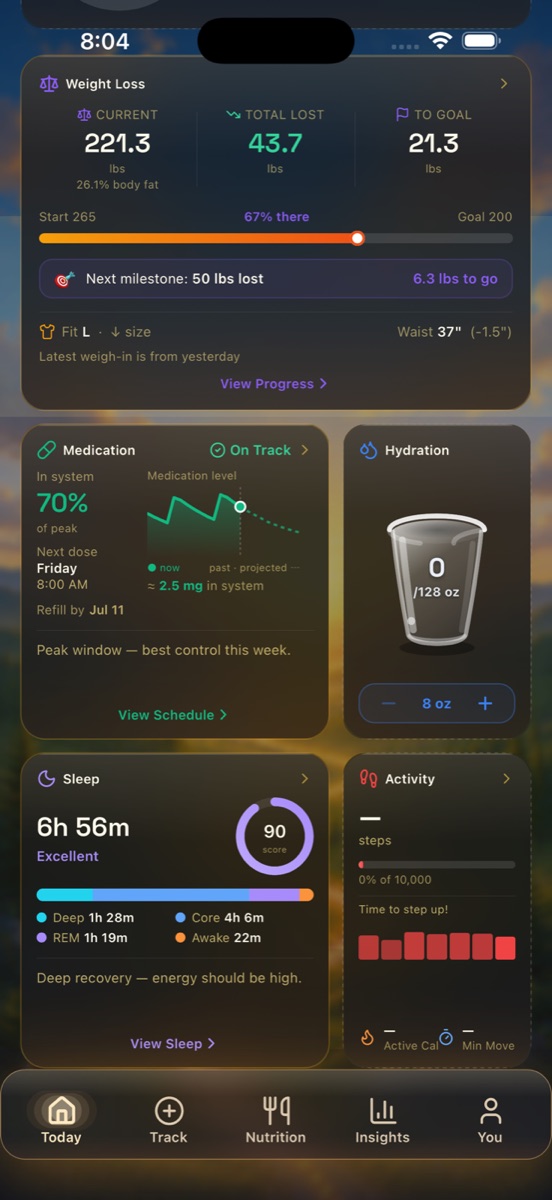
Scroll down and Today becomes your dashboard: a Weight Loss card (total lost, % to goal, next milestone), a Medication card (how much is in your system, next dose, refill date), Hydration, Sleep (with your Sleep Score), and Activity. You can reorder or hide any of these in You → Customize Tab Cards.
Heading to an appointment?
These at-a-glance numbers — total lost, body fat %, waist change, medication adherence, next refill, Sleep Score — are exactly what a clinician wants to hear. You don't have to memorize them: DayByDay can compile them into a doctor-ready PDF for you. See Reports & your doctor.