
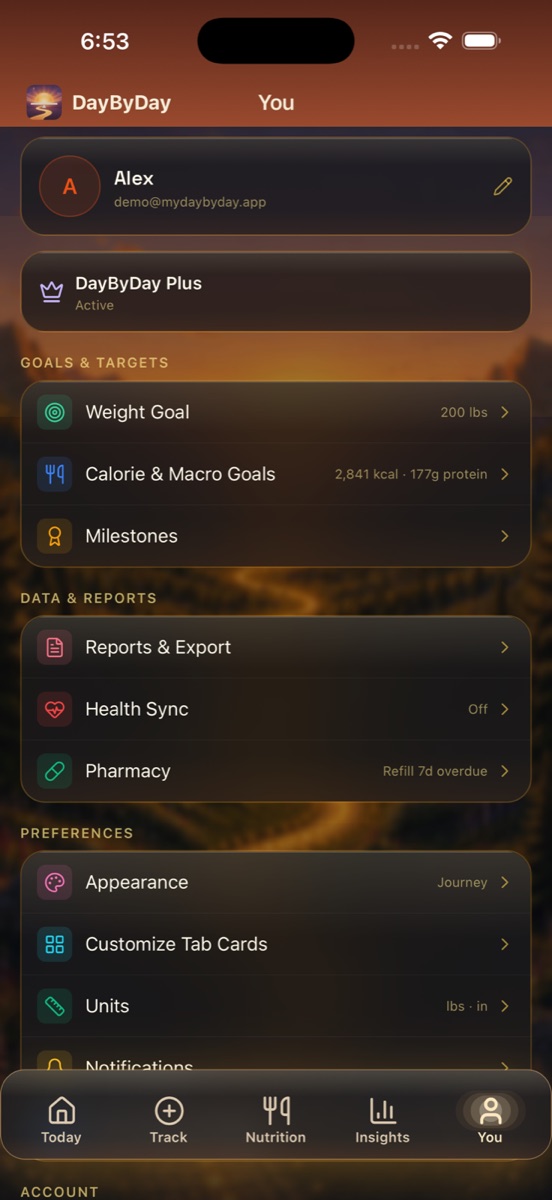
The You tab is home base for everything that isn't day-to-day logging — who you are, what you're working toward, how the app looks, and where your data goes. It's organized into a few simple groups so you never have to hunt.
Profile & plan
At the top is your profile — your name and email, with an edit pencil to update your details. Just below, your plan status is shown plainly: Free, Core, or Plus. If you're subscribed, this is where you'll see “Active” and the door to Manage Subscription. See Plans & billing for the full breakdown.
Goals & Targets
- ✦Weight Goal — your goal weight, and the finish line your progress is measured against.
- ✦Calorie & Macro Goals — your daily calorie and protein/macro targets (for example, 2,841 kcal · 177g protein). These power the rings on the Nutrition tab.
- ✦Milestones — how your weight-loss milestones are calculated, including auto-scaling that adapts to how much you have to lose.
Data & Reports
- ✦Reports & Export — your doctor-ready Health Report PDF and per-table CSV export. See Reports & your doctor.
- ✦Health Sync — connect Apple Health so weight, steps, sleep, and workouts flow in on their own. See Apple Health sync.
- ✦Pharmacy — your refill cadence, next pickup, and prior-auth tracking. If a refill is overdue, it'll surface right here (for example, “Refill 7d overdue”).
Heading to an appointment?
Reports & Export lives in this group for a reason — it's the one tap that turns a month of logging into a doctor-ready PDF, with your flagged insights, medication summary, and symptoms included automatically. See Reports & your doctor.
Preferences — make it yours
- ✦Appearance — switch between clean Light, restful Dark, and our signature Journey Mode (the warm sunset interface that makes checking in feel like a reward).
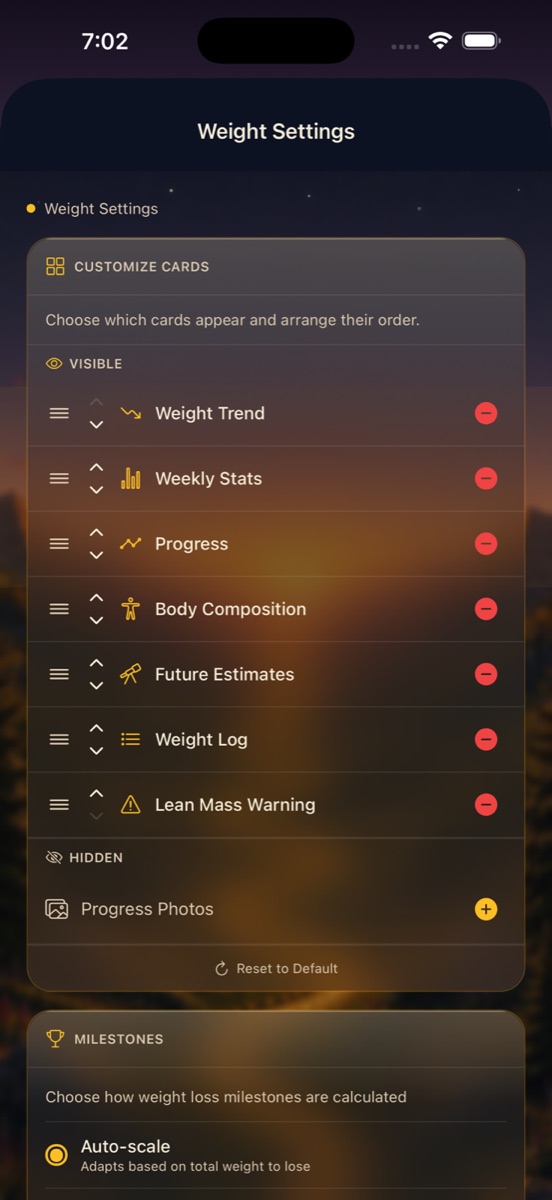
- ✦Customize Tab Cards — reorder, show, or hide the cards on each tab so the app shows you exactly what you care about.
- ✦Units — lbs or kg, inches or cm.
- ✦Notifications — your gentle reminders and milestone celebrations. See Notifications & reminders.
Customize Tab Cards, up close
Tap Customize Tab Cards and you can tailor each tab to your journey. Drag the Visible cards into the order you want, remove the ones you don't need, and add any from Hidden back in. On the Weight tab, for instance, you can arrange Weight Trend, Weekly Stats, Progress, Body Composition, Future Estimates, Weight Log, and the Lean Mass Warning — or pull in Progress Photos. There's always a Reset to Default if you want to start fresh.
Account
Under Settings → Account you'll find sign-in details, support, and the controls for exporting your data or deleting your account and everything you logged anytime. Your data is yours, always. See Your account and Privacy & legal.